Develop a healthier relationship with money.
A spending plan you sort yourself. Your transactions arrive, you put each one where it belongs, and one number shows what’s left to spend or save this month.
14-day free trial, then $19.99 a month.
“Cash Flow & Capital was the first budgeting app that made sense to me.”
- Income$6,250of $6,250 expected
- Committed$3,300$2,035 paid so far
- Flexible$1,722of $2,550 planned
Manual on purpose
Transactions arrive. You sort them.
Most money apps sort your spending for you. When one files a pharmacy run under Shopping, you stop trusting the numbers.
Cash Flow & Capital syncs your accounts but never files anything behind your back. You sort each transaction with a tap or two, and that small habit is how you learn where your money really goes.
Try it: sort the new one.
- Trader Joe'sGroceries−$84.12
- ShellGas−$46.30
- Chase MortgageMortgage−$1,850.00
Budgets ask you to account for every penny. A spending plan asks one thing: spend less than you make.
If there’s extra, it finds its way to savings. Cash Flow & Capital takes your income, subtracts what’s already committed and what you’ve spent, and shows what’s left to spend or save.

Committed vs. flexible
Committed expenses have little or no wiggle room. Flexible ones do. Keeping them apart is what makes your left-to-spend number possible, and every category is yours to name.
Committed
$3,300Little or no wiggle room
- Mortgage$1,850
- Car payment$485
- Student loan$400
- Insurance$310
- Utilities$255
Flexible
$2,550Room to adjust as the month goes
- Groceries$900
- Shopping$500
- Dining$450
- Kids$450
- Gas$250
Capital
What you own and what you owe, on one page.
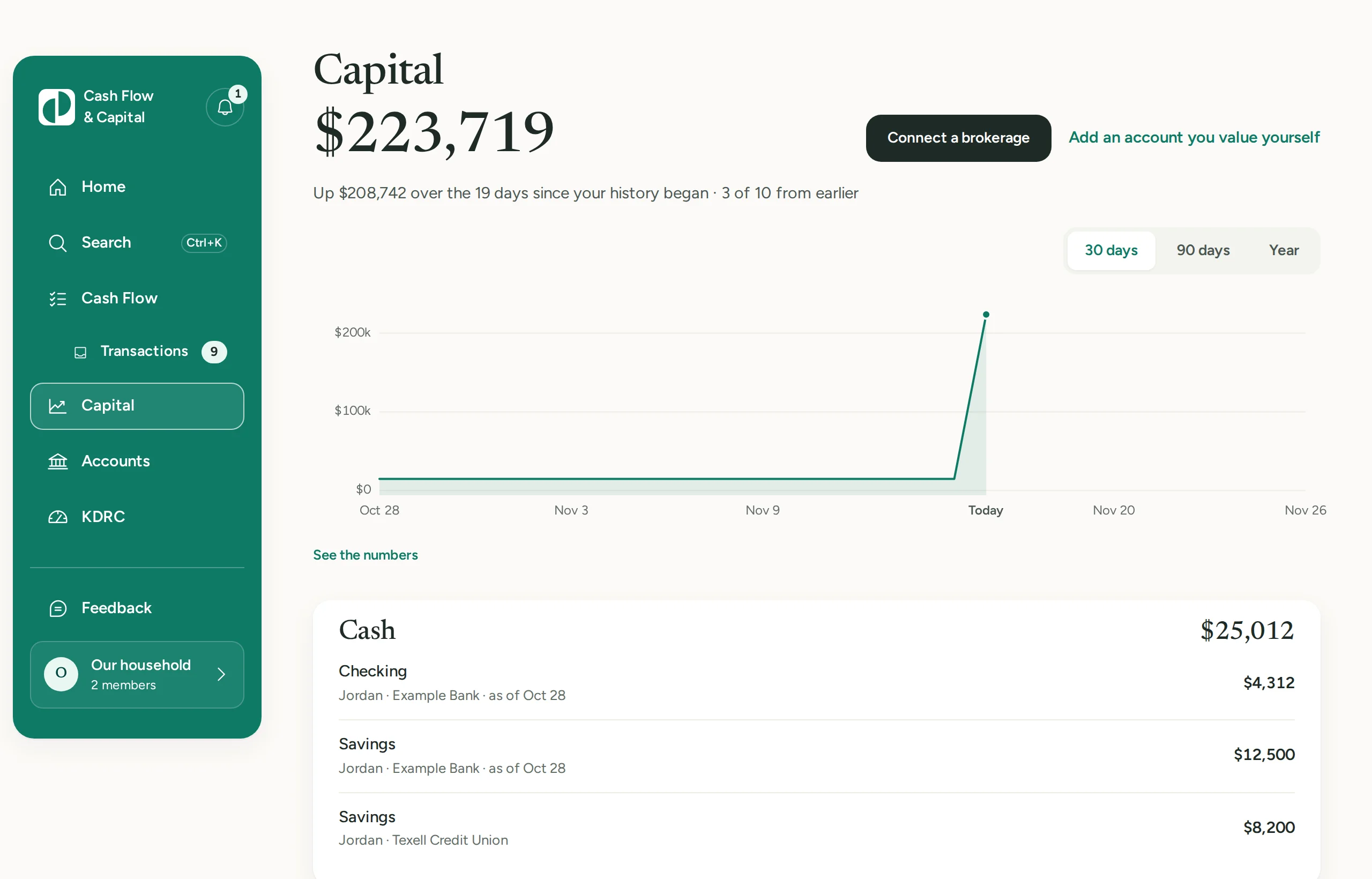
Cash Flow is this month. Capital is the whole picture: your accounts added up into one net worth figure, with its line over 30 days, 90 days or a year.
Banks and brokerages connect through Plaid. A home, an annuity or a loan no bank lists, you add and value yourself. Each account shows whose it is and how fresh its balance is.
Two planners sit underneath. Retire on Time estimates your retirement from numbers you type. The Debt Planner puts your debts in order and shows the month each one is paid off.
- Cash
- Checking, savings, cards
- Investments
- Brokerage, retirement, property
- Reserves
- Annuities, CDs
- Debt
- Mortgages, loans, carried balances
How it works
Connect your accounts
Link your bank and brokerage accounts securely through Plaid, so everything is in one place.
Build your spending plan
Add your income, your committed expenses, and the flexible categories you actually use.
Sort as you go
New transactions show up ready to sort. A few seconds each, and you always know what’s left.
“Money has always stressed me out. Cash Flow & Capital was the first budgeting app that made sense to me. After using it for a couple of minutes, I began to feel like I was in control and confident about my money. The system works!”
“I always hated how apps would sort my transactions in the wrong places. The fact that Cash Flow & Capital syncs the transactions and lets us sort each one is a game changer.”
Where your data goes
We don’t sell your data, share it with advertisers or use it to train models.
Your bank login goes to Plaid
You sign in to your bank in Plaid’s window, never in our app. We never see your bank username or password.
It reads. It can’t move money.
The connection reads your accounts, balances and transactions, and holdings for a brokerage. It can’t move money or change anything at your bank.
Your card goes to Stripe
You enter your card in Stripe’s own form, and it never reaches us. We keep the plan, its status and the card’s last four digits.
Delete it from Settings
Any owner can delete the household. That removes its bank connections at Plaid, cancels the subscription and deletes its accounts, transactions, plan and notes.
Simple pricing
Both plans start with a 14-day free trial.
Monthly
$19.99 / month
Cancel anytime.
Annual Save 17%
$199.99 / year
That’s about $16.67 a month.
Questions
Do I need a card to start the trial?
Yes. You add a card when the 14-day trial starts, and it isn’t charged until the trial ends.
What happens when the trial ends?
Your card is charged for the plan you picked, $19.99 a month or $199.99 a year, unless you cancel first. We email you a reminder before the trial ends.
How do I cancel?
In Settings, under Subscription. Your household keeps the app until the end of the period you’ve paid for, and nothing is charged after that. The current period isn’t refunded.
Can my partner use it with me?
Yes. An owner invites them by email from Settings, as an owner or a viewer. Everyone in the household sees the same accounts, transactions and plan, and one subscription covers all of you.
Does it work on my phone?
Yes, in your phone’s browser. The app has a layout made for a phone screen.
Which banks work?
U.S. banks and brokerages that Plaid connects to. For an account Plaid can’t reach, you can add it and type its balance by hand.
Does the app move my money?
No. It reads your accounts through Plaid and can’t move money or change anything at your bank.
How is this different from an app that sorts for me?
New transactions wait for you instead of being filed for you. The app may suggest a category, like the one you picked for that merchant last time, but nothing is sorted until you choose.